





Why Your Notion Tracker Isn’t Working (Fix It Fast)
If your Notion tracker isn’t working, it’s usually because it’s too complex, not tied to a clear outcome, or requires more effort to maintain than the value it provides. Most creators build overly detailed systems with multiple databases, filters, and views—then stop using them within weeks. The fix is simple: reduce friction, define one measurable objective, automate what you can, and track only actionable data.
Table Of Content
- Quick Answer
- Why Most Notion Trackers Break Down
- 1. You’re Tracking Too Many Things
- The Problem
- The Fix: Ruthless Reduction
- Example (Freelancer Case)
- 2. Your Tracker Isn’t Connected to a Clear Outcome
- The Problem
- Step-by-Step Fix
- Rule
- 3. Manual Data Entry Is Killing Momentum
- The Problem
- The Fix: Automate & Template
- Use
- Example
- 4. You Don’t Review the Tracker Weekly
- Add a Weekly Review System
- 5. Your Dashboard Is Visually Overwhelming
- Signs Your Layout Is Broken
- Fast Fix Layout Structure
- Step-by-Step: Rebuild Your Notion Tracker in 15 Minutes
- Step 1: Duplicate Your Current Tracker
- Step 2: Delete 50% of Properties
- Step 3: Define One Goal
- Step 4: Simplify Views
- Step 5: Add One Review Template
- Step 6: Test for 7 Days
- Real-World Example: Creator Revenue Tracker
- Rebuilt Version
- Common Mistakes That Break a Notion Tracker
- 1. Building Before Defining the Goal
- 2. Copying Complex Templates
- 3. Tracking Vanity Metrics
- 4. No Weekly Reflection
- 5. Overusing Relations & Rollups
- 6. Designing for Aesthetics Over Utility
- Best Practices for a High-Performance Notion Tracker
- 1. One Tracker = One Outcome
- 2. Track Leading Indicators
- 3. Keep Update Time Under 2 Minutes
- 4. Use Weekly Reviews as a Trigger
- 5. Audit Monthly
- 6. Start Minimal, Add Slowly
- FAQ
- Why does my Notion tracker stop working after a few weeks?
- How do I simplify a Notion tracker?
- What should I track in a Notion productivity tracker?
- Is it better to use one big Notion tracker or multiple small ones?
- How often should I review my Notion tracker?
- Should I use complex relations and rollups?
- Final Takeaway
Quick Answer
Your Notion tracker fails when:
- It tracks too many metrics
- It’s not connected to a real goal
- It requires manual updates daily
- You don’t review it weekly
- The layout creates friction
Fix it fast by:
- Defining one primary outcome
- Reducing tracked fields by 50%
- Using formulas and templates
- Adding a weekly review system
- Simplifying views to one main dashboard
Why Most Notion Trackers Break Down
A Notion tracker system works only if it’s sustainable.
Creators and freelancers often confuse complexity with productivity. They build elaborate habit trackers, content planners, income dashboards, and KPI databases — but don’t design for usability.
The problem isn’t Notion.
The problem is tracker architecture and behavior design.
Let’s fix that step-by-step.
1. You’re Tracking Too Many Things
The Problem
You created a productivity tracker with:
- 12 properties
- 4 relational databases
- 3 rollups
- 6 filtered views
Now updating it feels like admin work.
Tracking becomes a chore.
The Fix: Ruthless Reduction
Ask:
“If I could track only 3 metrics, which would actually move revenue or output?”
Example (Freelancer Case)
Instead of tracking:
- Time spent
- Tasks completed
- Energy level
- Focus rating
- Client messages
- Revenue per hour
- Platform growth
Track only:
- Billable hours
- Content published
- Revenue generated
Delete the rest.
Your Notion productivity tracker should clarify action — not document life.
2. Your Tracker Isn’t Connected to a Clear Outcome
The Problem
You built a “Daily Tracker.”
But what is it optimizing for?
Growth? Revenue? Consistency?
Without a defined outcome, tracking becomes vanity logging.
Step-by-Step Fix
- Open your Notion tracker database
- Write a single outcome at the top:
- “Increase monthly income to $5K”
- “Publish 12 videos per month”
- Align every property to that outcome
- Delete unrelated fields
Rule
If a metric does not influence your primary goal, remove it.
This makes your Notion goal tracker actionable.
3. Manual Data Entry Is Killing Momentum
The Problem
If updating your tracker takes more than 2 minutes per day, you’ll stop.
Manual tracking creates cognitive resistance.
The Fix: Automate & Template
Use:
- Default property values
- Database templates
- Formula properties
- Checkboxes instead of text fields
Example
Instead of typing:
“Published YouTube video today”
Use:
- Checkbox: Published (✔)
- Formula:
if(prop("Published"), 1, 0)
Now your weekly output auto-calculates.
Less friction = consistent usage.
4. You Don’t Review the Tracker Weekly
A tracker without review is useless.
Tracking data without reflection = passive logging.
Add a Weekly Review System
Create:
- A filtered view (Last 7 Days)
- A “Weekly Review” template page
Inside it, answer:
- What worked?
- What didn’t?
- What will I adjust?
This transforms your Notion habit tracker into a decision-making tool.
5. Your Dashboard Is Visually Overwhelming
Creators love aesthetic dashboards.
But productivity systems should prioritize clarity over design.
Signs Your Layout Is Broken
- Multiple widgets
- Too many views
- Visual clutter
- Too much scrolling
Fast Fix Layout Structure
Keep only:
Top Section
- Primary Goal (1 sentence)
Middle
- Main Database (Table View)
Bottom
- Weekly Review Section
One page. One function.
That’s it.
See Also: Ultimate Finance Tracker Notion Free: Brilliant Dashboard
Step-by-Step: Rebuild Your Notion Tracker in 15 Minutes
Step 1: Duplicate Your Current Tracker
Keep a backup.
Step 2: Delete 50% of Properties
Be aggressive.
Step 3: Define One Goal
Add it at the top of the page.
Step 4: Simplify Views
Keep only:
- Today
- This Week
- All Entries
Step 5: Add One Review Template
Include 3 reflection prompts.
Step 6: Test for 7 Days
If updating takes longer than 2 minutes — simplify again.
Real-World Example: Creator Revenue Tracker
A freelance designer tracked:
- Mood
- Task category
- Time estimate
- Time spent
- Platform source
- Client type
- Notes
They stopped using it after 3 weeks.
Rebuilt Version
Properties:
- Date
- Client
- Revenue
- Billable Hours
- Paid (Checkbox)
Weekly:
- Total Revenue (Formula)
- Total Hours (Rollup)
Usage jumped from 30% consistency to 95%.
Why?
The tracker served a financial objective — not curiosity.
Common Mistakes That Break a Notion Tracker
1. Building Before Defining the Goal
You design structure before deciding purpose.
2. Copying Complex Templates
Most viral templates are built for demonstration, not daily use.
3. Tracking Vanity Metrics
“Time spent planning” does not equal results.
4. No Weekly Reflection
Data without analysis doesn’t change behavior.
5. Overusing Relations & Rollups
Relational databases are powerful — but unnecessary for simple systems.
6. Designing for Aesthetics Over Utility
A clean table beats a pretty dashboard.
Best Practices for a High-Performance Notion Tracker
1. One Tracker = One Outcome
Don’t combine habits, content, and finances in one database.
2. Track Leading Indicators
Instead of tracking revenue, track:
- Offers sent
- Content published
- Outreach messages
These drive results.
3. Keep Update Time Under 2 Minutes
If it feels heavy, simplify.
4. Use Weekly Reviews as a Trigger
No review = no improvement.
5. Audit Monthly
Remove fields that no longer matter.
6. Start Minimal, Add Slowly
Growth > complexity.
FAQ
Why does my Notion tracker stop working after a few weeks?
Most Notion trackers fail because they require too much manual input or track too many metrics. If updating your tracker takes longer than two minutes daily, consistency drops.
How do I simplify a Notion tracker?
Delete unnecessary properties, define one clear outcome, reduce views to three maximum, and use formulas or checkboxes to automate tracking.
What should I track in a Notion productivity tracker?
Track only metrics that directly influence your main goal, such as revenue, published content, or client outreach. Avoid vanity or passive data.
Is it better to use one big Notion tracker or multiple small ones?
Multiple focused trackers perform better. One database per goal reduces complexity and increases usage consistency.
How often should I review my Notion tracker?
Review weekly. A tracker without review becomes passive logging instead of a decision-making system.
Should I use complex relations and rollups?
Only if necessary. Most freelancers and creators can operate effectively with a single streamlined database.
Final Takeaway
If your Notion tracker isn’t working, it’s not a discipline problem — it’s a system design problem.
Simplify.
Tie it to one outcome.
Reduce friction.
Review weekly.
A good tracker should feel invisible — it supports execution instead of becoming another task.
If you implement even half of the fixes above, your Notion tracker will shift from abandoned database to operational control system within days.
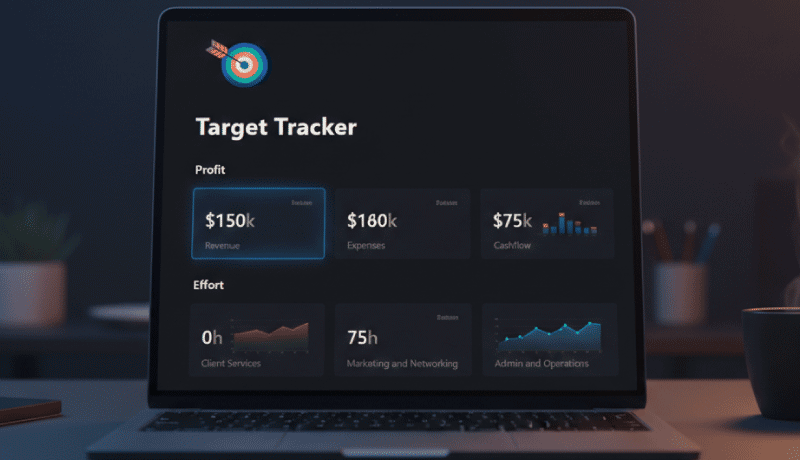
📌 Here is a ready-to-use template designed to simplify your workflow (Target Tracker). Feel free to copy it, customize it, and tailor it to match your business needs.