





How to Create a Notion Habit Tracker in 10 Minutes (Step-by-Step)
Building better habits doesn’t require complex apps or expensive tools. A simple Notion habit tracker can help you stay consistent, monitor progress, and actually follow through on your goals. The best part? You can set one up in about 10 minutes — even if you’re new to Notion.
Table Of Content
In this guide, you’ll learn how to create a clean, effective tracker, plus tips to make it stick long-term.
Why Use a Notion Habit Tracker?
A Notion habit tracker works because it combines flexibility with visibility. Instead of juggling multiple apps, you keep everything in one workspace.
Benefits include:
- Fully customizable layouts
- Daily, weekly, or monthly tracking options
- Progress visualization with checkboxes and formulas
- Easy integration with your planner or task system
- Free to use
For productivity-focused workflows, this makes Notion one of the best habit tracking tools available.
What You’ll Build in 10 Minutes
By the end of this tutorial, you’ll have:
- A daily habit tracking database
- Checkbox tracking system
- Simple progress monitoring setup
- A reusable template for future months
Let’s build it.
Step-by-Step: Create a Notion Habit Tracker
Step 1: Create a New Page
Open Notion and:
- Click New Page
- Name it Habit Tracker
- Choose Table – Full Page
This gives you a structured database to track habits.
Step 2: Add Your Habit Columns
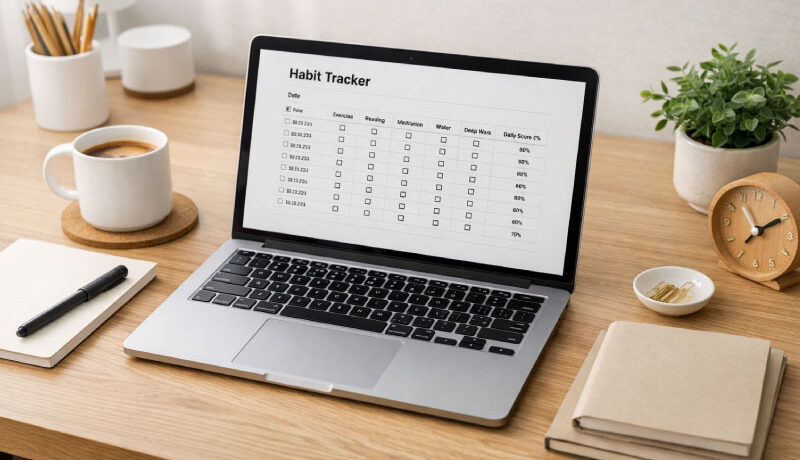
Rename the default Name column to Date.
Now add new columns for your habits:
- Exercise
- Reading
- Meditation
- Water Intake
- Deep Work
Set each column type to Checkbox.
Each row will represent a day, and each checkbox marks completion.
Step 3: Add Dates Automatically
Click the Date column → change type to Date.
Then:
- Add entries for the next 30 days
- Or duplicate rows for quick setup
This instantly creates your monthly tracker.
Step 4: Add a Progress Formula (Optional but Powerful)
Add a new column → choose Formula.
Use this simple formula to calculate daily completion:
(round((toNumber(prop("Exercise")) +
toNumber(prop("Reading")) +
toNumber(prop("Meditation")) +
toNumber(prop("Water Intake")) +
toNumber(prop("Deep Work"))) / 5 * 100))
Rename it Daily Score (%).
Now you’ll see how consistent you are each day.
Step 5: Create a Reusable Template
Click the dropdown next to New → New Template.
Name it New Day and pre-fill it with your habit fields.
Now each day, you can add a fresh entry instantly.
Tips to Make Your Notion Habit Tracker Actually Work
Most people fail at habit tracking not because of tools, but because of design. Use these proven tips:
Keep It Minimal
Track only 3–5 habits at first. Too many reduces consistency.
Attach Habits to Existing Routines
Example:
- Read after breakfast
- Journal before sleep
Track Identity Habits, Not Just Outcomes
Instead of:
- “Lose weight”
Track:
- “Worked out today”
Review Weekly, Not Daily
Use a weekly review page to spot patterns and adjust goals.
Best Notion Habit Tracker Enhancements
Once your basic system works, you can upgrade it with:
- Monthly progress charts
- Habit streak counters
- Linked planner dashboard
- Mobile-friendly layout
- AI-powered review notes
These upgrades turn your simple tracker into a productivity system.
See Also: Habit Tracker Notion That Instantly Builds Discipline
FAQ: Notion Habit Tracker Setup
Is Notion good for habit tracking?
Yes. Notion is one of the most flexible habit tracking tools because you can customize databases, formulas, and dashboards to match your workflow.
Can I use a free Notion habit tracker template?
Absolutely. Many free templates exist, but building your own ensures it fits your habits and goals perfectly.
How many habits should I track?
Start with 3–5 habits. Once those become automatic, add more gradually.
Can I track habits on mobile?
Yes. Notion’s mobile app lets you check off habits daily, making it easy to stay consistent.
Final Thoughts
A simple Notion habit tracker can transform how you build routines, stay disciplined, and reach long-term goals. The key isn’t complexity — it’s consistency. Start with a small system today, track daily actions, and refine over time.
If you want to improve productivity, income, or skills this year, your habits are the foundation. Build the tracker now, and let momentum do the rest.
📌 This practical template (Habit Tracker) is built to save you time and effort. Duplicate it, adapt it, and make it work perfectly for your brand.