






Image Plus That Transforms WordPress Visuals Fast
Image plus tools are essential for anyone who wants to create attractive and professional WordPress content without wasting time. WP Image Plus is a smart plugin that brings image searching, editing, and customization directly into the WordPress editor. Instead of moving between different websites and design programs, users can manage everything from one simple interface. This makes publishing faster, easier, and far more enjoyable.
Table Of Content
Image Plus That Simplifies Finding Quality Graphics
A strong image plus solution begins with easy access to great visuals. WP Image Plus includes a built-in search feature that connects to royalty-free image providers such as Wikimedia Commons, Open Clipart, and Icon Finder. Users can search for pictures right inside the WordPress dashboard and insert them into posts with just a few clicks. This eliminates the need to hunt for images on multiple websites or worry about complicated downloads WP Image Plus Documentation. For bloggers and marketers who publish content regularly, this simple search capability saves hours of work every week.
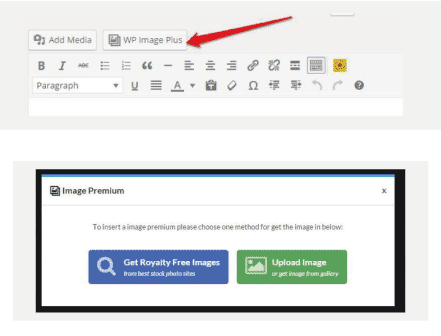
Image Plus with Powerful Built-In Editing Features
Another major advantage of this plugin is its integrated editor. The image plus system allows users to resize, crop, add text, apply filters, and adjust colors directly inside WordPress. Instead of opening Photoshop or other design software, all changes can be made instantly after selecting an image. This feature is especially useful for beginners who want professional results without technical knowledge. Quick editing tools make it possible to customize graphics to perfectly match blog themes and brand styles, helping every post look more polished.
Image Plus That Connects to Popular Image Platforms
WP Image Plus goes even further by allowing integration with well-known image sources such as Flickr, Pixabay, Instagram, Twitter, and Unsplash. By adding simple API keys in the settings, users can expand their search results and access millions of additional photos WP Image Plus Documentation. This flexibility ensures that there is always a wide selection of visuals available for any topic. The ability to pull images from multiple platforms makes image plus a complete creative hub inside WordPress.
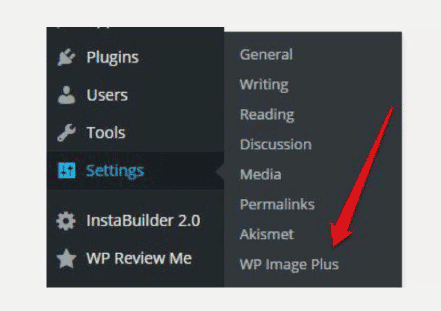
Image Plugin That Makes Publishing Faster and Easier
The real strength of WP Image Plugin is how smoothly it fits into the normal publishing workflow. With one click on the plugin icon, users can open a window to search, upload, or edit images before inserting them into a post WP Image Plugin Documentation. Everything happens without leaving the editor screen. This streamlined process reduces frustration and speeds up content creation dramatically. When images are easy to manage, writers can focus on producing valuable articles instead of dealing with technical obstacles.
Photoshop Banner Templates with Powerful Fitness Design
Conclusion:
Great visuals are a key part of successful websites, and WP Image makes handling those visuals simple. From fast image searches to built-in editing and easy insertion, the plugin removes many of the common challenges of working with graphics online. Whether you are a blogger, marketer, or small business owner, this tool helps transform ordinary posts into professional pages. With image plugin, creating attractive WordPress content becomes quicker, smarter, and more enjoyable.