





All-in-One Notion Planner Template for Busy Creators
If you’re a digital creator or freelancer juggling content, clients, deadlines, and ideas, the best notion planner template is one that centralizes everything in a single dashboard. An all-in-one setup combines task management, content planning, goal tracking, and revenue oversight without forcing you to switch between multiple apps.
Table Of Content
- Quick Answer
- Why Creators Need an All-in-One Notion Planner Template
- Core Components of a Creator-Focused Notion Planner Template
- 1️⃣ Master Dashboard (Your Control Center)
- Implementation Steps
- 2️⃣ Task & Project Management Database
- Essential Properties
- Why This Matters
- Example
- 3️⃣ Content Calendar (Built from the Same Database)
- Why This Works
- 4️⃣ Client & Collaboration Tracker
- 4️⃣ Client & Collaboration Tracker
- 5️⃣ Weekly Review System
- Step-by-Step: How to Build This Notion Planner Template
- Step 1: Create the Core Task Database
- Step 2: Add Relations & Rollups
- Step 3: Build Filtered Dashboard Views
- Step 4: Automate with Templates
- Real-World Example: Creator Workflow
- Common Mistakes with a Notion Planner Template
- 1- Overcomplicating the System
- 2- Separating Tasks and Content Planning
- 3- Ignoring Weekly Reviews
- 4- Designing for Aesthetic Over Function
- 5- No Clear Priority System
- Best Practices for Long-Term Use
- Keep It Lean
- Use Status-Based Workflow
- Review Every Sunday
- Archive Monthly
- Duplicate for Clients (If Needed)
- FAQs
- What is the best notion planner template for creators?
- Can I use one Notion planner for clients and content?
- How do I simplify a cluttered Notion planner template?
- Is a free notion planner template enough for freelancers?
- How do I automate workflows in a Notion planner template?
- Final Thoughts
This guide shows you exactly how to structure, build, and optimize a creator-focused Notion planner template that reduces friction and increases execution speed.
Quick Answer
What is the best Notion planner template for busy creators?
An effective all-in-one notion planner template should include:
- A master dashboard
- Task + project database
- Content calendar
- Client tracker
- Goal + habit tracker
- Weekly review system
- Revenue or income tracker
The key is using linked databases and filtered views so everything connects but stays simple.
Why Creators Need an All-in-One Notion Planner Template
Creators don’t just manage tasks — they manage systems.
You’re handling:
- Content pipelines
- Brand collaborations
- Client deliverables
- Editorial calendars
- Invoices and payments
- Personal productivity
A generic daily planner won’t scale. You need a creator-specific Notion productivity system that integrates operations and planning.
See Also: Notion Social Media Planner Template Free: Amazing Resource
Core Components of a Creator-Focused Notion Planner Template
1️⃣ Master Dashboard (Your Control Center)
Your dashboard should answer three questions instantly:
- What must I do today?
- What’s in progress?
- What needs attention soon?
Implementation Steps
- Create a main page called Creator Planner Dashboard
- Add linked views of:
- Tasks (filtered: Due Today)
- Projects (filtered: Active)
- Content Calendar (filtered: This Week)
- Add a weekly goal widget at the top
- Keep design minimal — avoid clutter
Tip: Use toggle sections to hide secondary information.
2️⃣ Task & Project Management Database
This is the backbone of your notion planner template.
Essential Properties
- Task Name
- Status (Not Started, In Progress, Done)
- Due Date
- Priority
- Project Relation
- Content Type (Optional)
Why This Matters
Instead of scattered to-do lists, everything lives in one database and is filtered dynamically.
Example
If you’re a YouTube creator:
- Project: “February Content Batch”
- Tasks:
- Script video
- Film
- Edit
- Create thumbnail
- Upload & optimize
Each task is connected to the project and visible in your weekly view.
3️⃣ Content Calendar (Built from the Same Database)
Avoid creating a separate planner.
Instead:
- Use the task database
- Add a Calendar view
- Filter by Content Type = “Publish”
Now your publishing schedule updates automatically.
Why This Works
This prevents duplication and keeps your notion planner template streamlined.
4️⃣ Client & Collaboration Tracker
Freelancers especially need this.
Create a simple database with:
- Client Name
- Contact Info
- Project Status
- Invoice Status
- Payment Date
- Notes
Link client projects to your main task database.
Now you can filter tasks by client when needed.
4️⃣ Client & Collaboration Tracker
Freelancers especially need this.
Create a simple database with:
- Client Name
- Contact Info
- Project Status
- Invoice Status
- Payment Date
- Notes
Link client projects to your main task database.
Now you can filter tasks by client when needed.
5️⃣ Weekly Review System
Without review, planning fails.
Add a recurring template button for:
- Wins of the week
- Revenue summary
- What worked
- What needs improvement
- Next week’s priorities
This builds reflection into your planner.
See Also: 7 Notion Planner That Simplifies Goal Tracking
Step-by-Step: How to Build This Notion Planner Template
Step 1: Create the Core Task Database
Start here. Everything connects to it.
Avoid multiple task lists.
Step 2: Add Relations & Rollups
Create:
- Projects database
- Clients database
Relate tasks to both.
Use rollups to:
- Count incomplete tasks per project
- Track client workload
Step 3: Build Filtered Dashboard Views
Add:
- Today view
- This Week view
- Overdue view
- Active Projects view
These filtered views turn a basic notion planner template into a smart system.
Step 4: Automate with Templates
Inside your task database:
Create templates like:
- YouTube Video Workflow
- Client Deliverable Workflow
- Instagram Carousel Workflow
Each preloads tasks and structure.
This saves hours weekly.
Real-World Example: Creator Workflow
Let’s say you’re a freelance designer with content marketing.
Your Notion planner might look like:
Dashboard
- Today’s Tasks
- Active Client Projects
- Content Publishing This Week
- Monthly Revenue Tracker
Databases
- Tasks (master)
- Projects
- Clients
- Revenue Log
Everything connects. Nothing duplicates.
This structure scales from $0 to six figures without needing restructuring.
Common Mistakes with a Notion Planner Template
1- Overcomplicating the System
Too many databases = friction.
Solution: Start with one task database.
2- Separating Tasks and Content Planning
This causes duplication.
Solution: Use filtered views instead.
3- Ignoring Weekly Reviews
Without review, your planner becomes a storage system.
4- Designing for Aesthetic Over Function
Minimal layouts outperform aesthetic overload.
5- No Clear Priority System
Add priority tags or urgency flags.
Otherwise everything feels equally important.
Best Practices for Long-Term Use
Keep It Lean
If a section isn’t used weekly, remove it.
Use Status-Based Workflow
Instead of basic checkboxes, use:
- Idea
- Planning
- Production
- Review
- Published
This works especially well for content creators.
Review Every Sunday
Creators need operational alignment weekly.
Block 30 minutes minimum.
Archive Monthly
Move completed projects to an archive page.
This keeps your notion planner template fast and clean.
Duplicate for Clients (If Needed)
If you manage multiple retainer clients, duplicate project templates rather than redesigning.
FAQs
What is the best notion planner template for creators?
The best notion planner template for creators includes a master dashboard, unified task database, content calendar view, client tracking system, and weekly review process — all connected through linked databases.
Can I use one Notion planner for clients and content?
Yes. Use one master task database and filter by content type or client. This prevents duplication and improves efficiency.
How do I simplify a cluttered Notion planner template?
Remove unused databases, consolidate tasks into one master database, and replace separate planners with filtered views.
Is a free notion planner template enough for freelancers?
Yes, if structured correctly. Most freelancers need better architecture — not premium templates.
How do I automate workflows in a Notion planner template?
Use database templates that preload task checklists, statuses, and relations. This eliminates repetitive setup.
Final Thoughts
An all-in-one notion planner template isn’t about complexity — it’s about integration.
Busy creators don’t need more tools.
They need tighter systems.
Build one task database.
Connect everything.
Review weekly.
Refine monthly.
That’s how a Notion productivity system becomes a revenue engine — not just a planner.
Thank You,
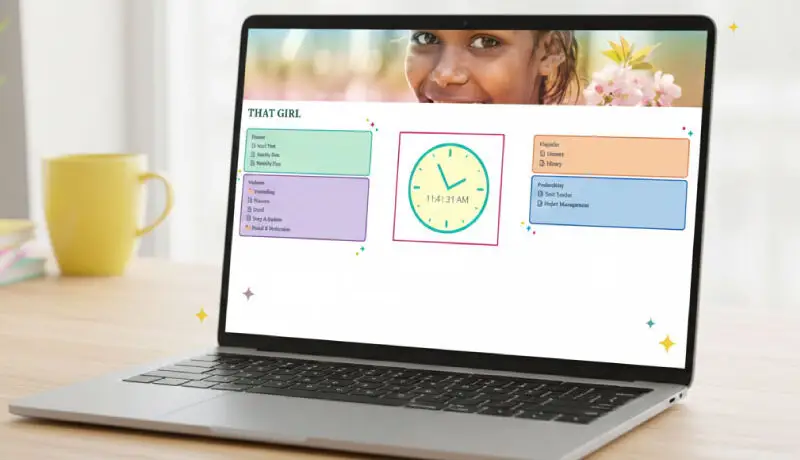
📌 This practical template (THAT GIRL) is built to save you time and effort. Duplicate it, adapt it, and make it work perfectly for your brand.